VisualSitemaps: The Ultimate Guide for 2026

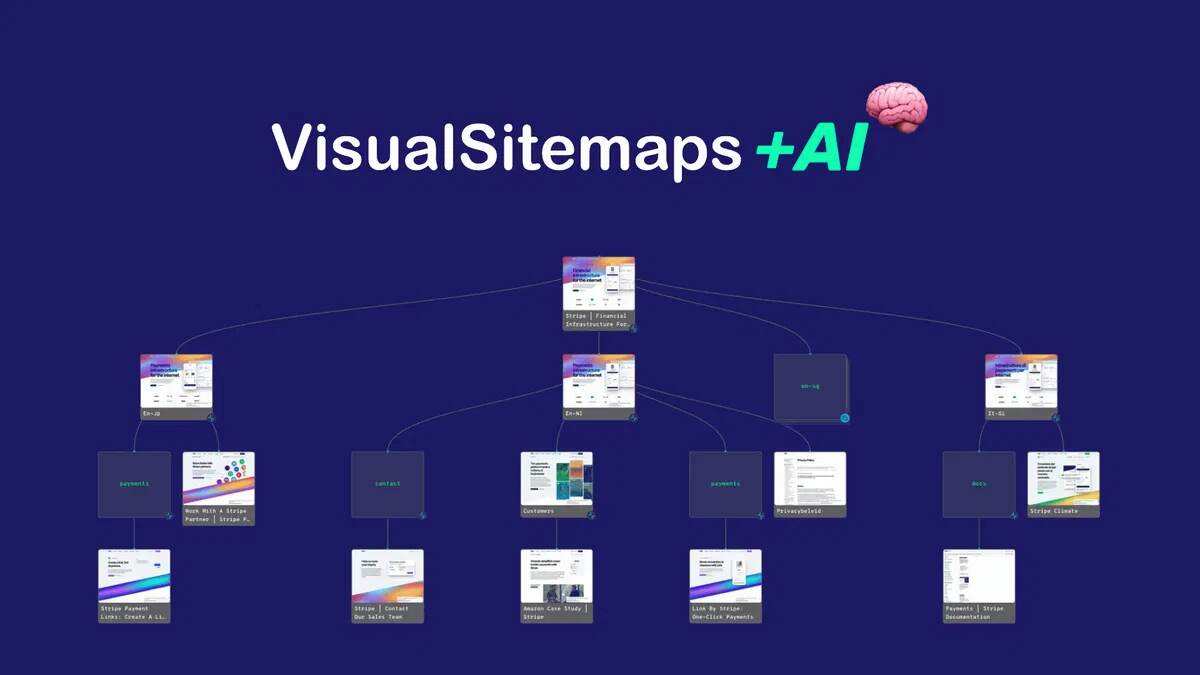
VisualSitemaps is a powerful AI-powered tool designed to help web professionals and teams understand, audit, and optimize website architecture using interactive visual sitemaps. Here’s a comprehensive, in-depth review that covers everything you could want to know about VisualSitemaps, with a focus on SEO, usability, features, pricing, and real-world use cases.
VisualSitemaps: The Ultimate Guide for 2026
What Is VisualSitemaps?
VisualSitemaps is a web-based SaaS platform that automatically crawls websites, captures high-resolution screenshots of each page, and arranges them into interactive, visual sitemaps. These sitemaps are more than just pretty diagrams—they’re actionable blueprints for site audits, redesigns, competitor analysis, SEO planning, and team collaboration. VisualSitemaps leverages AI to analyze and optimize website structure, identify gaps and redundancies, and even propose a future-state architecture.
Who Is It For?
- Web designers and UX/UI professionals
- Marketing agencies and SEO specialists
- SaaS companies and digital product teams
- Webmasters managing large or complex sites
- Anyone planning a website redesign or migration
Key Features & Capabilities
1. AI-Powered Website Crawling & Mapping
- Automated Crawling: Enter a URL and VisualSitemaps crawls the site, capturing screenshots of every page (including public and password-protected pages).
- High-Resolution Visuals: Each page is represented by a crisp screenshot, giving you a true sense of design, branding, and content at a glance.
- Customizable Depth: Control crawl depth, exclude/include specific URLs, and manage crawl settings for precise mapping.
- AI Analysis: The platform doesn’t just map what exists—it analyzes your site’s hierarchy, finds weak or redundant structures, and suggests optimized layouts.
2. Interactive, Editable Sitemaps
- Drag-and-Drop Editor: Rearrange pages, create new branches, or restructure site architecture visually.
- Custom Tagging & Annotation: Add notes, labels, and tags to pages for collaboration or documentation.
- Flows: Build user journeys or content flows by linking pages in custom sequences.
- Map Isolation: Focus on specific sections or branches for detailed analysis.
3. Collaboration & Sharing
- Team Collaboration: Invite team members, assign roles, and work together on sitemaps.
- Screenshot Annotation: Mark up screenshots with comments or suggestions directly in the map.
- Shareable Links: Generate secure, shareable links for stakeholders or clients (with view/edit permissions).
- Versioning & History: Track changes, compare versions, and revert as needed.
4. Visual Comparisons
- Design Change Tracking: Compare two crawls to visualize design or content changes over time.
- Highlight Differences: Instantly spot what’s changed between versions (great for QA and redesigns).
5. Planning & SEO Integration
- Content Planning: Use the sitemap as a living content plan—add notes for new pages, mark pages for update/removal, and map out future content.
- SEO Insights: Identify orphan pages, crawl bloat, duplicate content, and structural SEO issues.
- Export Options: Download high-res screenshots, export sitemap data (CSV, XML), or integrate with Google Drive.
6. Security & Privacy
- Password-Protected Crawling: Map private or staging sites securely.
- Role-Based Access: Control who can view or edit each sitemap.
- GDPR Compliance: Data is handled securely, and you control what’s stored or shared.
How VisualSitemaps Works: Step-by-Step
1. Start a New Crawl
- Enter your website’s root URL.
- Set crawl depth, exclusions, and authentication (if needed).
- Start the crawl—VisualSitemaps does the rest automatically.
2. Review the Visual Sitemap
- See your entire site structure as a visual map with screenshots.
- Zoom in/out, drag to navigate, and click any page to see details.
3. Edit & Annotate
- Rearrange branches, add/delete pages, and tag or comment as needed.
- Use the drag-and-drop editor for restructuring.
4. Collaborate & Share
- Invite teammates or clients, assign roles, and share secure links.
- Use annotations for feedback and documentation.
5. Analyze & Optimize
- Run AI optimization to get suggestions for better structure.
- Use the comparison tool to track changes over time or after redesigns.
6. Export & Integrate
- Download screenshots, export sitemap data, or send to Google Drive.
- Use exported data for further analysis or documentation.
In-Depth Feature Analysis
AI Optimization Explained
VisualSitemaps’ AI doesn’t just document your site—it actively analyzes and proposes improvements. Here’s what it does:
- Hierarchy Analysis: Checks for logical structure, deep/nested pages, and weak branches.
- Redundancy Detection: Finds duplicate or competing pages.
- Crawl Bloat Identification: Flags unnecessary or low-value pages that dilute SEO.
- Gap Analysis: Identifies missing content or weak topical coverage.
- Future-State Blueprint: Suggests a reorganized sitemap for better UX and SEO.
Visual Comparisons
- Track Redesigns: Compare old and new site versions visually.
- QA Support: Instantly see if a deploy changed the wrong pages.
- Client Reporting: Show stakeholders the impact of changes.
Flows & User Journeys
- Map User Paths: Visualize how users move through the site.
- Highlight Conversion Funnels: Show key steps and drop-off points.
- Content Planning: Sequence content for launches or campaigns.
Customization & Scalability
- Unlimited Maps: Create as many sitemaps as you need (plan-dependent).
- Large Site Support: Handles sites with thousands of pages.
- Tagging & Filtering: Organize complex sites with custom tags and filters.
Integrations
- Google Drive: Export sitemaps and screenshots directly to your Drive for documentation or sharing.
- API Access: (For advanced users) Integrate VisualSitemaps with other tools or automate workflows.
Pricing & Plans (as of 2026)
VisualSitemaps offers several lifetime plans via AppSumo, each with different limits:
- Tier 1: $79 (Mini plan)
- Tier 2: $159 (Pro plan)
- Tier 3: $279 (Pro plan, higher limits)
- Tier 4: $399 (Pro plan, highest limits)
All plans include:
- Lifetime access
- Future updates to the Mini or Pro plan (depending on tier)
- 60-day money-back guarantee
- Ability to upgrade/downgrade between tiers while the deal is live
Plan differences: Mainly in the number of projects, users, pages per crawl, and advanced features (see the VisualSitemaps site for the latest details).
Use Cases & Real-World Applications
1. Website Redesigns
- Instantly map all existing pages, including hidden or orphaned ones.
- Identify redundant, outdated, or low-value pages to remove.
- Plan new structure visually and share with stakeholders.
2. SEO Audits
- Spot crawl bloat, duplicate content, and orphan pages.
- Visualize site depth and internal linking opportunities.
- Use AI suggestions to improve topical coverage and hierarchy.
3. Competitor Benchmarking
- Crawl competitor sites to see their structure and content strategy.
- Compare your site’s architecture to industry leaders.
- Identify gaps or opportunities for differentiation.
4. Client Reporting
- Deliver beautiful, interactive sitemaps as part of your agency deliverables.
- Annotate and comment to explain recommendations.
- Use visual comparisons to show the impact of your work.
5. Content Planning
- Map out future pages, launches, or campaigns.
- Tag and annotate for editorial workflow.
- Use flows to sequence user journeys or conversion funnels.
User Experience & Interface
Onboarding & Ease of Use
- Simple Start: Just enter a URL—no technical setup needed.
- Intuitive UI: Drag, zoom, and edit maps visually.
- Helpful Documentation: Extensive knowledge base and video tutorials.
- Responsive Support: Highly rated by users for fast, friendly help.
Performance & Reliability
- Fast Crawling: Even large sites are mapped in minutes.
- Stable Platform: Handles high volumes and complex sites reliably.
- Secure by Design: Data privacy and secure crawling are prioritized.
Pros & Cons
Pros
- Instantly visualizes complex sites—no more manual mapping
- AI-powered optimization and actionable insights
- Powerful collaboration and sharing features
- High-res screenshots and export options
- Supports private and staging sites
- Lifetime pricing available (great value for agencies)
- Excellent support and documentation
Cons
- Initial confusion with pricing tiers for some users
- Limited sharing options on lower plans
- No native integration with some project management tools (as of 2026)
- AI suggestions are helpful but may require expert review for large, complex sites
Real User Feedback
Positive
- “VisualSitemaps saved us hours on every redesign project.”
- “The AI suggestions actually made our site structure better.”
- “Clients love the visual maps—makes it easy to explain what we’re doing.”
- “Support is fast and genuinely helpful.”
Negative
- “Took a bit to understand the plan limits and sharing options.”
- “Would love to see more integrations with PM tools.”
SEO Impact & Best Practices
Why Visual Sitemaps Matter for SEO
- Crawlability: Search engines need clear, logical site structures for efficient crawling.
- Internal Linking: Visual maps help spot orphan pages and optimize internal links.
- Content Gaps: AI analysis highlights missing or weak topics.
- Duplicate Content: Easily find and fix redundant or competing pages.
- Site Migrations: Reduces risk of lost pages or broken links during redesigns.
How to Use VisualSitemaps for SEO
- Crawl Your Site: Get a visual overview and spot issues fast.
- Run AI Optimization: Review suggestions for hierarchy, gaps, and bloat.
- Plan Changes Visually: Edit the map to plan new pages, redirects, or content updates.
- Export & Document: Use exports for SEO documentation or team handoffs.
Comparison With Alternatives
| Feature | VisualSitemaps | Slickplan | Dynomapper | Octopus.do |
|---|---|---|---|---|
| Visual Sitemaps | Yes (AI-powered) | Yes | Yes | Yes |
| AI Optimization | Yes | No | No | No |
| Screenshot Capture | Yes (high-res) | No | Yes | No |
| Collaboration Tools | Yes (team, comments) | Yes | Yes | Yes |
| Flows/User Journeys | Yes | No | No | Yes |
| Price (Lifetime) | Yes (AppSumo) | No | No | Yes |
| Private Site Support | Yes | Yes | Yes | Yes |
| Export Options | CSV, XML, images | CSV, XML | CSV, XML, images | CSV, XML |
| API Access | Yes | Yes | No | No |
Final Verdict: Is VisualSitemaps Worth It?
VisualSitemaps is a standout tool for anyone needing to audit, plan, or optimize website architecture—especially if you value visual clarity, AI-driven insights, and team collaboration. Its combination of high-res visual mapping, editable sitemaps, AI optimization, and robust export/sharing options makes it ideal for agencies, SEO pros, and web teams handling complex projects.
The lifetime pricing via AppSumo is a huge value-add, especially for agencies or teams working on multiple sites. While there are minor limitations (mainly around integrations and plan clarity), the core features are best-in-class and evolve rapidly with user feedback.
Recommended for:
- Agencies and teams managing site redesigns or migrations
- SEO specialists needing actionable, visual site audits
- Web designers and UX pros seeking better planning tools
- Anyone wanting to understand and improve their website’s structure
Quick Stats & Summary
- AI-powered visual sitemaps, editable and shareable
- Crawl public and private sites, unlimited maps (plan-dependent)
- Export to CSV, XML, images, Google Drive
- Lifetime deals available via AppSumo
- 4.7/5 user rating (AppSumo, 2026)
- Excellent support, fast onboarding, and robust documentation
Useful Links
If you need a visual, actionable, and AI-powered way to map, audit, and improve websites, VisualSitemaps is one of the best choices on the market in 2026. Want a sample visual sitemap or have a specific use case? Let me know, and I can walk you through a real-world workflow!


