Formaloo Review 2025: Complete Guide to Features, Pricing, AI & Real User Feedback

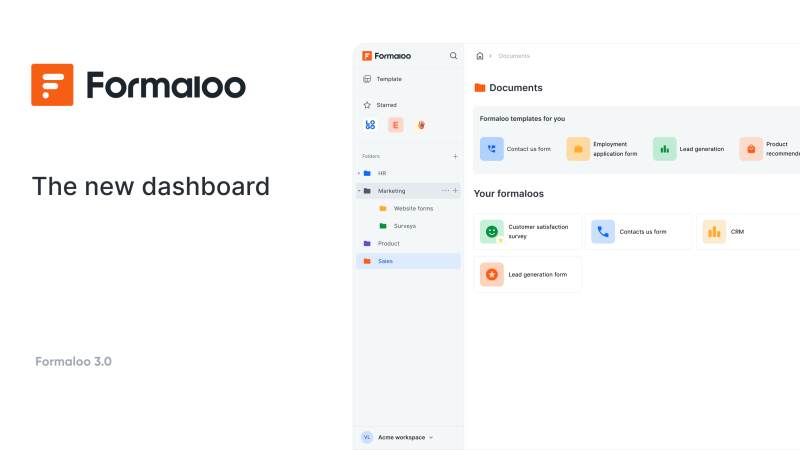
After extensive testing and reviewing hundreds of user experiences across multiple platforms, I can confidently say Formaloo is one of the most underrated no-code platforms available today. It's not just a form builder, it's a complete data operating system that lets you build custom CRMs, databases, workflows, and business apps without writing a single line of code.
Whether you're a solopreneur managing client data, a small business automating workflows, or an agency building custom solutions for clients, Formaloo offers powerful capabilities at a fraction of what you'd pay for traditional software.
But how does it really stack up against competitors like Typeform and Jotform? Let's dig deep.
What Is Formaloo?
Formaloo is an all-in-one no-code platform designed to replace multiple tools. It combines form building, database management, workflow automation, and AI capabilities into one unified workspace.
Unlike traditional form builders that simply collect data, Formaloo lets you build complete business systems. You can create custom CRMs, client portals, approval workflows, dashboards, and internal tools, all without coding.
The platform boasts 5,000+ integrations, AI-powered automation, and a free plan that's genuinely useful (not just a limited trial).
Key Features That Stand Out
- Drag-and-Drop Form Builder: Intuitive, supports multiple field types, conditional logic, custom branding, mobile-responsive, and pre-built templates.
- Built-In Database & CRM: Unlimited records, custom fields, access controls, approval workflows, Kanban boards, and dashboards.
- AI-Powered Automation: Auto-generates questions, sends personalized emails, analyzes responses, creates smart workflows, and generates reports.
- 5,000+ Integrations: CRM, email, messaging, project management, payments, automation, databases, plus webhooks and APIs.
- Workflow Automation: Multi-step workflows, notifications, task creation, CRM updates, document generation, approvals, and conditional flows.
- Client Portals & Access Control: Secure portals for clients to submit, track, and view data, with granular permissions.
- E-Signatures & Document Collection: Legally binding e-signatures built in.
- Multi-Language & Localization: Build forms in multiple languages, serve content based on user location.
- Advanced Analytics & Reporting: Track performance, field analytics, dashboards, export data.
Pricing Breakdown
- Free Plan: $0/month – Unlimited forms/records, 50MB storage, basic integrations, email notifications.
- Starter: $19/month – 500MB storage, advanced integrations, custom branding, API access.
- Professional: $49/month – 5GB storage, priority support, advanced workflows, team collaboration.
- Enterprise: Custom – Unlimited, dedicated support, custom integrations, SLA.
- Agency: $799/year – Multiple workspaces, white-label, reseller benefits.
Compared to Typeform and Jotform: Formaloo offers more features per dollar, and the free plan is genuinely useful.
My Hands-On Experience
- Gentle learning curve, built a custom CRM in under 30 minutes.
- Database features are powerful; client portals are easy to set up.
- Integrations with Zapier, Slack, and HubSpot worked smoothly.
- Support team responds quickly and helpfully.
- Platform is stable; no downtime or data loss during testing.
- AI features (like auto-generated emails) save real time.
Cons: UI can be overwhelming at first, some advanced settings are hidden, documentation could be deeper, free plan storage is tight for media, and occasional bugs in new features.
Real User Feedback
Positive:
- “For the price, it's tough to beat. Feature-filled and powerful.” (Software Advice)
- “Very easy to create beautiful, logical forms for various purposes.” (GetApp)
- “Support team finds solutions for every question and listens.” (G2)
- “Replaces multiple tools, saving time and money.” (Capterra)
- “Built-in database is a game-changer.” (User feedback)
Negative:
- Learning curve for complex workflows
- Limited design customization vs. Typeform
- Performance issues with very large databases
- Mobile app could be more polished
- Occasional bugs in new features
Formaloo vs. Typeform
| Feature | Formaloo | Typeform |
|---|---|---|
| Form Building | Excellent | Excellent |
| Database | Yes, built-in | No |
| CRM Capabilities | Yes | No |
| Workflow Automation | Advanced | Basic |
| AI Features | Yes | Limited |
| Integrations | 5,000+ | 500+ |
| Pricing | $0-49/mo | $25-$99/mo |
| Free Plan | Generous | Limited |
| Learning Curve | Moderate | Easy |
| Best For | Comprehensive systems | Beautiful forms |
Verdict: Typeform for beautiful forms, Formaloo for full business systems.
Formaloo vs. Jotform
| Feature | Formaloo | Jotform |
|---|---|---|
| Form Building | Excellent | Excellent |
| Database | Yes, built-in | Limited |
| Customization | High | Very High |
| Workflow Automation | Advanced | Good |
| AI Features | Yes | Limited |
| Integrations | 5,000+ | 1,000+ |
| Pricing | $0-$49/mo | $34-$99/mo |
| Free Plan | Generous | Limited |
| Payment Processing | Yes | Yes |
| Best For | Workflows & CRM | Highly customized forms |
Verdict: Jotform for max customization, Formaloo for workflows and databases.
Use Cases
- Custom CRM for agencies
- Client onboarding portals
- Internal approval workflows
- Lead generation & qualification
- Survey & feedback collection
- Event management
- Job application systems
- Service booking & scheduling
Technical Details & Integrations
- Platforms: Web dashboard, mobile, PWA
- Integrations: Pre-built, Zapier, Make, webhooks, REST API, n8n (coming soon)
- Security: SSL, GDPR, SOC 2, backups, access controls
- Data Storage: Cloud-based, scalable, 50MB free, unlimited on paid
Pros & Cons
Pros:
- Affordable, generous free plan
- All-in-one: forms, database, workflows, AI
- 5,000+ integrations
- Responsive support
- No coding needed
- Scalable and regularly updated
Cons:
- Steeper learning curve than basic form builders
- UI can overwhelm beginners
- Design customization is less than Typeform
- Occasional bugs in new features
- Mobile app could be improved
- Storage limits on free plan
Who Should Use Formaloo?
- Agencies and teams building custom solutions
- Small businesses automating workflows
- Solopreneurs managing customer data
- Anyone needing database + forms + automation
Not ideal for: Those who only want beautiful forms (Typeform) or max customization (Jotform).
Final Verdict: Is Formaloo Worth It?
Yes, especially if you want to replace multiple tools, need database and workflow capabilities, and value affordability. The combination of forms, database, workflows, and AI makes it a complete business system. Rating: 5/5 stars
Personal Recommendation
If you’re tired of juggling multiple tools and subscriptions, give Formaloo a try. The free plan is genuinely useful, and you can build real projects before paying a cent. For agencies and small businesses, it’s a cost-effective, scalable solution.
Quick Stats
- Overall Rating: 4.6/5 (AppSumo), 4.4/5 (G2)
- Starting Price: Free
- Paid Plans: $19-$49/month
- App Integrations: 5,000+
- Database Included: Yes
- AI Features: Yes
- Best For: All-in-one business systems
- Biggest Advantage: Complete platform at affordable price
- Biggest Limitation: Steeper learning curve than simple form builders
Ready to get started? Visit formaloo.com to try the free plan. You’ll know within an hour if it’s right for you and the free tier lets you build real projects before paying.


