Luminar Neo Review 2025: Is This AI Photo Editor Worth It?

If you are interested in purchasing Luminar Neo you can use the code Kispow for an additional 10% off. This code can be used on top of any running sales and comes at no extra cost to you.
Since I was young I have always loved photography and while I never had dreams of becoming a professional photographer, I did always want to skilled at photography.
As a millennial, I saw the rise and fall of dozens of photo based social media like Flickr, Dailybooth, DeviantArt, Model Mayhem We Heart It and Tumblr. Though many of these platforms still exist, I can't say that photo-based social media feels the same.
While we have social media like X, Bluesky, Facebook and Instagram, internet culture has changed significantly and has become more "influencer focused" rather than cultivating spaces for communities to grow.
Of course it is up to the user to utilise said social media in the way that best suits them, I still have fond memories of getting to know other photographers and starting/completing photography challenges to help refine my skills.
Why do I bring this up? Well, shortly after Instagram was released it dominated the space. At the time, I did not own a smart phone and with all the other social medias starting to die out, my passion for photography began following a similar trend. Platform after platform began shutting down and it felt like the only choice I had was to buy a smart phone, since you were unable to use Instagram on a browser back then.
When I finally got a smart phone I learned that Instagram didn't have the vibe of it's predecessors. While many of the photographers I had followed in the past were on the platform, there was very little community engagement and ultimately I didn't feel as inspired to better myself. Quickly the platform was swallowed by front camera selfies and I ended up clocking out altogether.
It wasn't until I started blogging on Pets Overload that I got back into photography. I had never done animal photography before, or realistically indoor photography and I realised just how much I had to learn.
My photos always looked grainy and dark, my framing was pretty much abysmal and though I was taking photos on a Cannon Rebel DSLR, all my photos looked like they had been taken on a point and shoot camera.
At first, I wasn't too fussed about my lack of skill since the website had very few readers, but as the website grew I began feeling inspired to improve my photography skills.
I reached out to my sister in hopes of getting some advise. You see, not only was she a professional photographer, but she also wrote for her own cat blog. Although she predominantly used Photoshop, as most photographers do, she recommended that I try out Luminar.
At first I tried out her copy of Luminar 2018, quickly growing fond of how easy it was to add filters and make edits to both framing and image quality. Though these features were amazing to me, it wasn't until I exported my images that I realised the absolute best part... It was capable of hyper-optimising image size and quality for web much better than Photoshop ever did.
If any of you are bloggers, you understand the frustration and struggle with web-image optimisation. While it would be so nice to upload the highest quality versions of our photos in .png format, the cost of hosting those images is abysmal. At the time, I was paying AWS between $5-10 a month and I shit you not, Luminar helped bring my costs down to around $2-5 without noticeably reducing quality.
Perhaps a bit niche, when I saw how much smaller my exported files were I immediately bought my own copy of Luminar 3, then later Luminar 4 and finally Luminar Neo.
To be quite frank, Luminar is the only software I've ever purchased every single upgrade of. While I didn't upgrade out of necessity, as older versions of Luminar worked just fine, the upgrades helped streamline my workflow significantly and provided me with even easier ways to get a product I wanted.
So, now that I've given you my life's story, let's chat about why I've been so in love with Luminar Neo and refuse to stop talking about it.
What Is Luminar Neo?
Luminar Neo is an AI-powered photo editing software developed by Skylum, released in February 2022 and continues to receive significant updates.
Unlike traditional photo editors, Luminar Neo has the capability of using artificial intelligence to automate simple editing tasks like colour balancing, lighting and more complex tasks like sky replacement, portrait retouching, and object removal.
Though Luminar Neo's AI capabilities are the most impressive feature, users still have the option to manually edit their images and to assist the AI with edits for more complicated tasks.
Although it is designed as a standalone application, users can use it as a plugin within Adobe and Apple products; like Photoshop and Lightroom.
Luminar Neo is available on Windows and MacOS, though Skylum does have a mobile app called Luminar Mobile which I will test out in the future.
Key Features
The following are the key features that separate Luminar Neo from it's predecessors. It should be noted that there are other tools available with Neo and that I am only mentioning the ones that were the most game changing for me.
Image Quality Tools
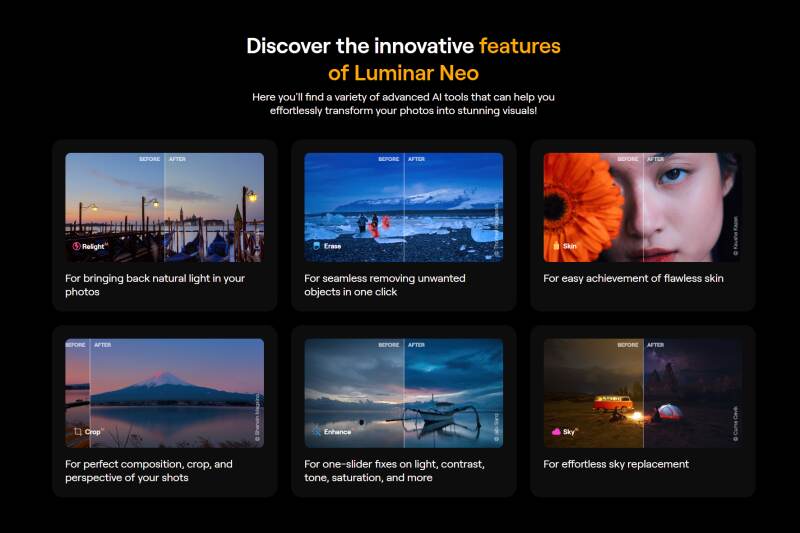
Noiseless AI: Advanced noise reduction, ridding images of spots from poor lighting.
Supersharp AI: Sharpens images and recovers detail that are lost from poor focus.
Structure AI: sharpens details without affecting humans in the photo.
Studio Light: Manual adjustments to lighting in 3D space after the photo is taken.
AI-Powered Editing Tools
Crop AI: Automatically detects the best rotation and perspective for a crop.
Sky AI: Automatically detects and replaces skies with realistic results
Atmosphere Enhancer AI: Creates a layer of fog, mist or haze to
Twilight Enhancer AI: Creates changes to the overall colouration of a piece.
Water Enhancer AI: Changes colouring of water without affecting other aspects of the photo.
Portrait Bokeh AI: Creates natural depth-of-field effects in portraits
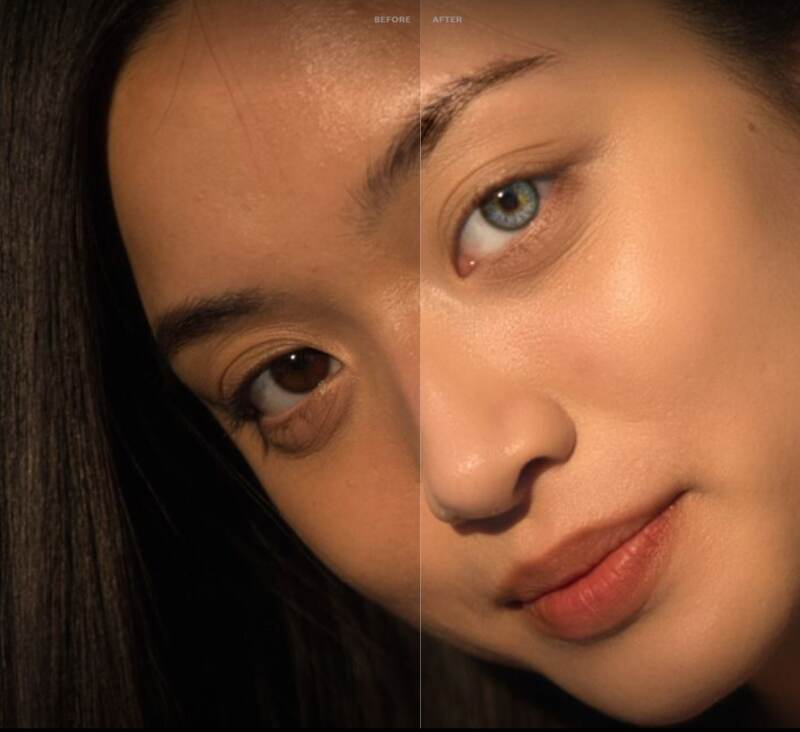
Skin AI: Removes skin defects and shine
Face AI: Allows changes to face light, slimness as well as adjustments to the eyes and mouth.
Body AI: Non-destructive body reshaping tools
Creative Tools
GenErase: AI-powered object removal
GenExpand: Expands image borders using AI generation
GenSwap: Background replacement tool
Organization & Workflow
- Catalogue system for organising photos
- Allows users to either select single images to edit or folders to import
- Layer-based editing
- Masking tools (AI and manual)
- Presets and LUTs
- Batch processing
- RAW file support
- Does not override original photos
- Auto saves and stores a history of all changes so the user can backstep
My Experience Using & Thoughts on Luminar Neo
Note: If you would like to see step-by-step testing of Luminar's functionality I will be linking examples at the end of this article. Tests will be done regularly, so feel free to bookmark this page if you would like to see examples and improvements throughout the years.
As I mentioned earlier, I've been an avid Luminar user for almost a decade, so I'm not surprised I'm a mega fan of Luminar Neo.
Admittedly, when my brother-in-law pulled me into his office to show it off in 2022 I wasn't very impressed and didn't actually think I would upgrade from Luminar 4. Much like my sister, my brother-in-law is a photographer and graphic designer, so he was very interested in tools like the Sky AI. Though it was cool to see in action, it wasn't something I needed given I don't do outdoor photography.
It wasn't until a few years later that I actually gave Luminar Neo another shot. I had become very interested in productivity tools, I was re-calibrating my blogging routine and I was releasing new music more frequently. So between designing dozens of thumbnails a week and editing more album covers, I was just itching to see if upgrading to Luminar Neo was going to lessen the load. To my surprise, it was actually a lot more impactful than I expected.
How Good is the AI in Luminar Neo?
Though the AI in Luminar Neo can feel somewhat "hit or miss" it is more often a hit in my experience. What I appreciate the most about the AI in Luminar Neo is that most of the options are tied to the use of sliders, allowing users to select how much of a feature they want to use.
Tasks that I would have never have done in the past, such as sharpening images or reducing noise are now part of my workload because of how easy they are. Realistically, I've been going back to photos I edited years ago on Luminar 3 and 4 and redoing them because of how much easier it is to fix these images.
By far my most used functions are Noiseless AI, Develop, Structure AI and whenever I have skin flair ups, Face & Skin AI.
In the past I would try to mask low quality images with preset filters in hopes of making the images appear as though it was intentional that they were out of focus or grainy, but these days I actually rarely use presets.
Of course, there are always going to be limitations to both the user's skill and a software's ability to fill the gaps, meaning that in my opinion whenever Luminar Neo's results end in a miss, it tends to be because of the user.
Now, that's not to say that Luminar Neo is perfect and that you're dumb for not getting perfect pictures; it's more of a comment on the fact that as I keep playing with Luminar Neo, I learn how I often don't understand what a tool is actually doing.
As mentioned earlier, since the majority of AI tools are based on sliders, this makes it extremely rare for images to not be edited in an acceptable manner. While the generative AI functions like GenErase, GenSwap and GenExpand may not always be perfect the first time around, they are so easy to retry and open up a realm of use for those who were never good at PhotoShop. For example, I've never been great at masking (or realistically blurring or burning), so having access to tools that will help me remove errors in an image are remarkable.
At most, my image correction skills in Photoshop included being able to remove some skin blemishes, but even then, if my blemishes were extreme... well, good luck... not gonna happen!
For me, my biggest "mind blown" moment was removing blur from images and essentially making photos taken from a distance look as intended. Since I'm not someone who takes photography outdoors often, I'm not always the best at stabilising images. So, to be able to run images through Supersharp AI or Structure AI in order to save them, my lord am I happy.
As a tag along, I'm not always thinking about framing when I take photography and often prefer to take wide shots that I will crop later; leaving me with two predicaments: how will I crop this later and will the crop that I select lead to the deterioration of the photo. I'm sure we've all been in a situation where only a portion of an image is usable and while image dimensions don't always matter for personal use, they tend to matter a lot more for online content or print media. Not only does Crop AI help you select the best compositional placement according to algorithm, but if your image loses quality, you have a plethora of tools to restore them.
Speaking of Crop AI (or more specifically Composition AI, the tool found internally); I find that it often helps me find a better crop for my photography. Even though I learned the basics of framing, I can't say that I always get it right. Back when I used to manage social media accounts for my theatre company it was extremely evident that I didn't understand spacing as well as I could have. Looking back at the images I uploaded from rehearsals, I'm often unhappy with the crops I selected and uploaded.
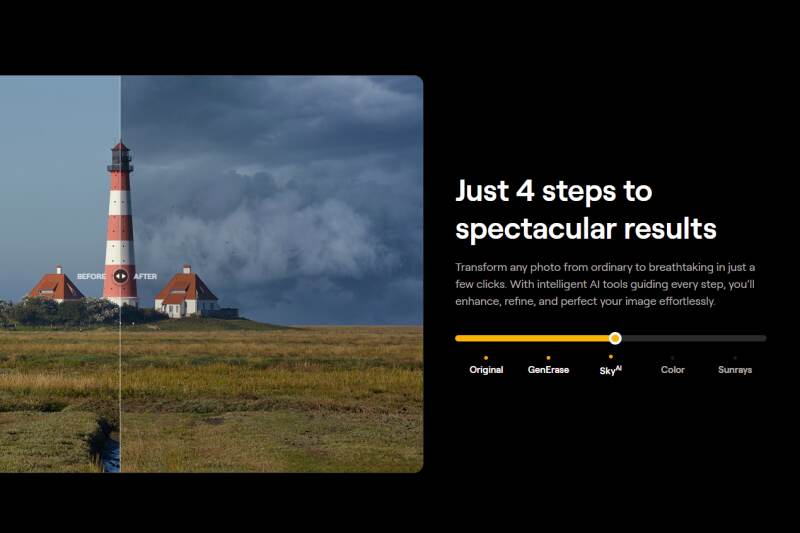
Though Composition AI doesn't always choose the absolute best crops, as it heavily depends on the subject in the image, it more often chooses a much better selection that I would have chosen for landscape and portrait images. Much like other "one click" AI, users can immediately make changes if they are unhappy with the AI, meaning that it can also be used as a starting point.
Overall, I have to say that I'm truly impressed with the AI utility in Luminar Neo and the more I play with the tools, the more I actually explore outside of my "go-to" styles of editing.
How Impactful are Luminar Neo's Updates? (When Should I Buy Luminar Neo?)
As much as I would like to say I regret not upgrading sooner, I think it was a good idea to upgrade when I did. Since you only get a year of unlimited updates when purchasing a perpetual licence, timing your purchase can prove to be beneficial to the user. Though realistically missing updates isn't going to lower the viability of the software, it is nice to get as many as possible in one swoop as updates often include the optimisation of workflow or finessing the coding to reduce the chances of lag and crashing.
Luckily for me (and you), the last time I received an update for Luminar Neo was about a year ago and since I recently partnered with Skylum I've been able to get the most recent updates. This means I can provide you with some direct comparisons. What I can say is, without a year of updates, it feels like not much has changed.
Looking through the patch notes I see that the copy of Luminar Neo I had was missing a number of stability, bug and some improved AI; it didn't seem to affect me too much. I have noticed that the software is working smoother than it was previously; however, given that I have a spicy gaming PC, I'm realistically shaving off milliseconds to seconds off of workflow and probably not seeing the impact these updates would have had on less spicy PCs. That being said, the majority of patches were only put out for MacOS, and while I use MacOS for music editing, I refuse to use it for anything else.
So, why mention this? Well, because I'm sure some of you will feel the same indecisiveness that I did... "Should I wait to buy this or should I do it now?"
My answer is, don't wait. While I'm sure I'm going to notice the nuances of the improvements as I keep playing around with Luminar Neo in the weeks to come, realistically there was nothing "game breaking" that made previous versions of it unusable or less impressive. You can, however, purchase a subscription for updates if you're concerned.
What Other Users Are Saying
Perhaps a bit odd, but I love reading and watching people review products, even when I already own them. While reviews are great for helping me decide whether or not to buy a product, I like reading reviews of products I already have because they give me the perspective of what works and doesn't work for others.
That being said, much like the anecdote about my brother-in-law, I recognise that what may be of interest to me may not be for others and vice versa; or what I deem to be a nuisance may not be for others. So, I thought I'd compile the most common pros and cons I've seen about Luminar Neo in hopes of covering perspectives that don't relate to me or that I have not experienced.
Positive Feedback
- Intuitive interface compared to Photoshop/Lightroom
- AI tools save significant editing time
- Great results with minimal effort
- One-time purchase option is cost-effective
- Excellent for portrait and landscape photography
Common Complaints
- Can be slow on older computers
- Catalog system less robust than Lightroom
- Some AI tools produce inconsistent results
- Extensions feel like nickel-and-diming (unfairly priced)
- Occasional bugs and crashes reported
- Subscription model introduced after promising one-time purchase (Note: for additional content, the base program does not require additional purchases.)
Who Should Use Luminar Neo?
Best For:
- Photographers who want to speed up their workflow
- Portrait and landscape photographers
- Beginners intimidated by Photoshop/Lightroom
- Hobbyists who don't want a subscription
- Content creators needing quick edits
- Users who primarily want to colour correct and add filters
- Bloggers who need high quality images that are well optimised for file size (AWS users)
Not Ideal For:
- Professional photographers needing precise catalog management
- Those requiring advanced compositing tools
- Users on older/slower computers
- Users who want to mark-up or design on top of their photos (unless they are simply layer addition)
Frequently Asked Questions
Is Luminar Neo a one-time purchase?
Yes, you can buy a lifetime license for, or choose a monthly or yearly subscription.
Can I use Luminar Neo as a Lightroom plugin?
Yes, Luminar Neo works as a plugin for Lightroom, Photoshop, and Apple Photos.
Does Luminar Neo work offline?
Yes, once installed, most features work offline. Some AI features may require initial online activation.
Can I edit RAW files in Luminar Neo?
Yes, Luminar Neo supports RAW files from most major camera brands.
Final Thoughts on Luminar Neo (Is Luminar Neo Worth the Purchase?)
I think it's fairly obvious where i stand with this, but yes, I truly believe Luminar Neo is worth the purchase.
Truthfully, even if you're someone who is taking photos for personal reasons I think it's well worth the price.
Given how easy Luminar Neo is to use and the fact that it is a one-time purchase, I don't think there's really a downside to buying it, especially if you're someone who likes looking at older photos you've taken over the years.
As I mentioned early in this article, photos I took ages ago on my Cannon Rebel DSLR, looked like they had been taken on a point and shoot camera and I've been able to not only increase the quality of these photos, but also make them look like they were taken by me now.
In comparison to other photo editors I've used, I feel like Luminar Neo is more powerful. While apps like Facetune are great for casual selfies, Luminar Neo helps refine images and add complexity to them. Though, I'm very excited to try Skylums alternative software like Luminar Neo mobile and Aperty as they might end up completely replacing the need for other mobile apps.
Overall, Luminar Neo is a 10/10 for me, I generally have no major complaints given how much control the software provides users and the fact that it has pushed me out of my comfort zone and has helped me edit images in ways I've never been capable of before.
If you are interested in purchasing Luminar Neo you can use the code Kispow for an additional 10% off. This code can be used on top of any running sales and comes at no extra cost to you.
My Other Posts About Luminar Neo
Still not convinced about purchasing Luminar Neo? No worries, I've got you! Below are specific tests I've completed using Luminar Neo. If there's a specific function you want me to test out, feel free to reach out to me so I can write a specific post!


